Navigate to the bottom of the Bulk Product Upload page.
Select Download Bulk Upload Templates
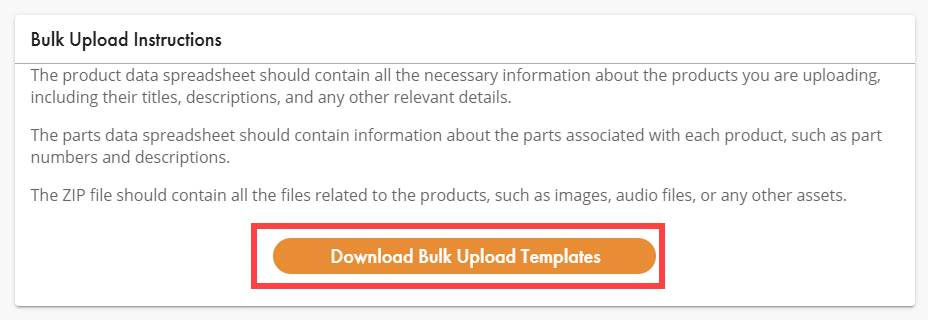
Download the Zip file bulk_upload_templates and unzip.
Open the file bulk_upload_templates contained inside.
Unzip the file Publisher_Name_Media/Assets
- Rename the file Vendor_Name your Vendor Name (example Wingert Jones)
- You can save this for future uploads
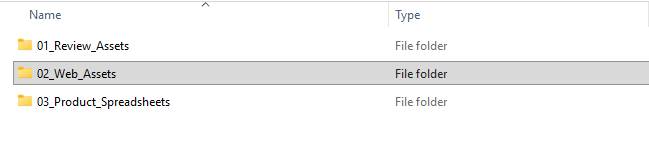
- Enclosed you will find three subfolders.
Do not change the names of these folders, or the folders contained inside of them.
- 01_Review_Assets – Use this folder only when submitting materials for editorial review prior to approval. These files are reviewed internally and are not customer-facing. Full Score’s and MP3 Recordings are requested.
- 02_Web-Assets – Use this folder to provide final approved publications that will be used on our website, for ePrints, or POD files.
- 03_Product_Spreadsheets – Do not use this folder
01_Review_ Assets:
- Please name your files as follows
- Publisher SKU#_Title of the piece
- 04626_This Song.pdf
- 04726_This Song.mp3
- Publisher SKU#_Title of the piece
- All review files can be put into the 01_Review _Assets folder
- This folder will be housed in your Vendor Name folder.
- If you have no other assets to provide select or drag and drop the Vendor Name folder into the Media Files (Zip) area of the Bulk Product Upload page.
02_Web_Assets
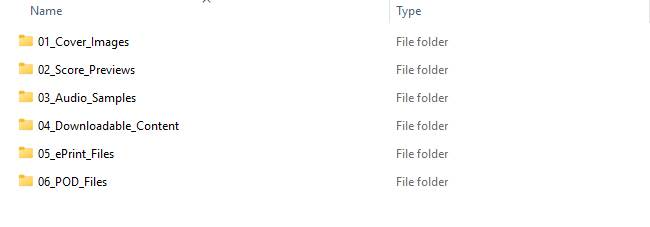
The Web Assets folder contains 6 subfolders to submit your approved assets for publication.
- These assets will be used on our website, and for customer purchase of ePrints, Downloadable content and POD items.
- You do not need to upload files for every folder. Leave folders empty if they do not apply to your products (ePrint, POD, Digital, etc.).
Subfolder Naming & file Rules
- 01_Cover_Images – Is used to provide cover art to be displayed on our website.
- File type: JPG
- Naming format: Publisher SKU#_Full Title
- Example: 040626_This Song.jpg
- Folder rule: Put only cover images into this folder
- 02_Score_Previews – Is used to provide score previews to be displayed on our website
- File type: PDF
- Naming format: Publisher SKU#_Full Title
- Example: 040626_This Song.pdf
- Folder rule: Put only score previews into this folder
- Score previews will be watermarked by JW Pepper before being placed on our website.
- 03_Audio_Samples – Is used to provide preview audio files to be displayed on our website.
- File type: MP3
- Naming format: Publisher SKU#_Full Title
- Example: 040626_This Song.mp3
- Folder rule: Put only audio previews into this folder
- 04_Downloadable_Content – Is used to provide files customers obtain after purchase.
- File type: MP3’s, PDF, PPT, or other non-proprietary Filetypes.
- Zip files together that belong to the same product purchase for easiest customer experience.
- Example: Part Predominant MP3’s for SATB choir zip all parts into one folder.
- Zip files together that belong to the same product purchase for easiest customer experience.
- Naming format: Publisher SKU#_Full Title
- Folder rule: Put only content available for purchase and download into this folder
- File type: MP3’s, PDF, PPT, or other non-proprietary Filetypes.
- 05_ePrint_Files – Is used to provide files customers print after purchase
- File type: PDF
- Choral Naming Format: Publisher SKU#_Full Title
- Example: 040626_This Song.pdf
- Instrumental Naming Format: Publisher SKU#_Sequentia number for part_Full Title_part name
- Examples:
- 040726_00_This Song_Score.pdf
- 040726_01_This Song_Flute.pdf
- 040726_02_This Song_1st Bb Clarinet.pdf
- Examples:
- Folder Rule: For instrumental sets, each part must be uploaded as a separate PDF file
- 06_POD_Files – Is used to provide files JW Pepper prints on the customer’s behalf after purchase.
- File type: PDF
- Choral naming Format: must be Publisher SKU#_Full Title
- Example: 040626_This Song.pdf
- Instrumental Naming Format: must be Publisher SKU#_Sequential number for part_Full Title_part name
- Examples:
- 040726_00_This Song_Score.pdf
- 040726_01_This Song_Flute.pdf
- 040726_02_This Song_1st Bb Clarinet.pdf
- Examples:
- Folder Rule: Files must be print-ready PDF’s suitable for professional printing
Include files here if you are offering large print options.
Was this article helpful?
That’s Great!
Thank you for your feedback
Sorry! We couldn't be helpful
Thank you for your feedback
Feedback sent
We appreciate your effort and will try to fix the article